How do I adjust the windage on a rifle scope? That's the first question almost every new shooter asks after their rifle hits left or right of the crosshairs. Windage is the horizontal adjustment on a scope that moves your point of impact sideways.
When it's dialed in correctly, the bullet lands right where your crosshairs point.
Most modern rifle scopes use turret clicks worth either ¼ MOA or 0.1 MIL per click. A ¼ MOA click shifts your impact about 0.73 inches at 100 yards. Before you turn any turret, you need to know your click value, your zero distance, and the wind conditions.
Here's how windage works, step by step.
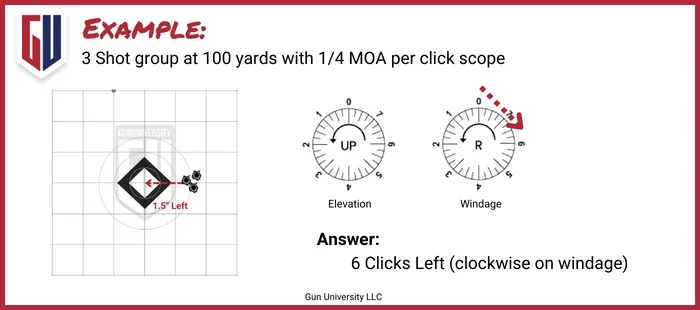
Image source: Web (Bing) / gununiversity.com (Web image (fair-use with source credit))
Quick Answer
How do I adjust the windage on a rifle scope? Bore sight the rifle at 50 yards. Establish a confirmed zero at 100 yards.
Shoot a group and measure the horizontal shift. Dial the turret to correct it, then verify with another group.
Why Your Point of Impact Doesn't Match Your Crosshairs
Windage refers to the horizontal (left to right) adjustment on a rifle scope. It compensates for both wind push and any mechanical offset between your bore and your scope's optical center. When your rifle shoots consistently to one side, your windage is out of sync.
This isn't always a scope problem. Rifle cant, inconsistent shoulder pressure, or a loose scope mount can all produce side-to-side shifts. The scope is only one part of the equation.
Start by identifying whether the error is truly windage or something else. Shoot a five-shot group at 100 yards and measure where the center lands relative to your point of aim. If the group is consistently left or right, you have a windage problem to fix.
Windage vs. Natural Rifle Cant
If you're left-handed and instinctively tilt the rifle, that produces a repeatable windage shift. It looks like the scope is off, but the scope may be tracking perfectly fine. Fix this by practicing your natural point of aim before you start adjusting turrets.
Don't compensate by aiming off to the side. That approach breaks down when the distance changes. It also fails when the wind picks up or precision matters.
Adjust the scope itself. That's what the turrets are built for.
What You Need to Know Before Touching a Turret
Before you dial anything, confirm three things: your click value, your turret type, and your current zero. Missing any of these will send your correction in the wrong direction.
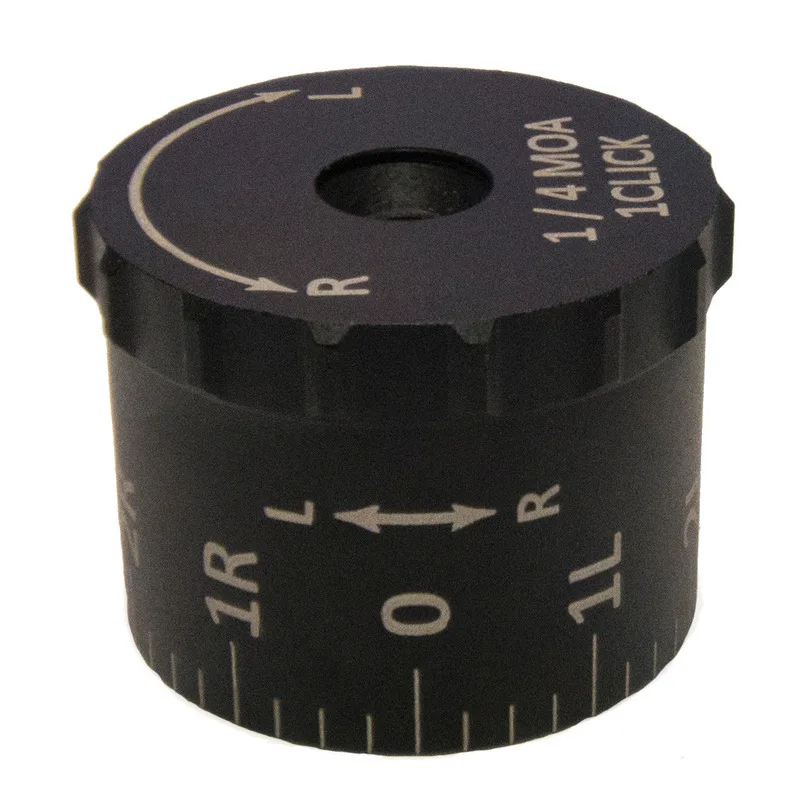
Image source: Web (Bing) / xhunter.com.au (Web image (fair-use with source credit))
Confirm Your Turret Click Value
Check the owner's manual for your scope model. Manufacturer specifications for major brands like Vortex Optics list the exact click value for each scope model on their website. If you can't find your manual, dial 20 clicks left and shoot a group.
Measure the shift, then divide by 20 to find your actual click value. Don't assume. As of 2026, most scopes use one of two standard click values.
| Click Value | Movement at 100 Yards | Typical On |
|---|---|---|
| ¼ MOA | ~0.73 inches | Hunting scopes, mid-range optics |
| 0.1 MIL | ~0.36 inches | Tactical scopes, long-range optics |
MOA vs. MIL: Know Your System
MOA (Minute of Angle) and MIL (Milliradian) are two angular measurement systems. One MOA equals roughly 1.047 inches at 100 yards. One MIL equals 3.6 inches at 100 yards.
Your scope's turrets are calibrated for one system, not both.
If your turret markings say "¼ MOA," every click equals a quarter minute. If they say "0.1 MIL," every click equals a tenth of a milliradian. Mixing the two systems produces corrections that are off by about 2.7 times.
Tactical Turret vs. Capped Turret
A tactical turret has exposed knobs you can adjust in the field without removing anything. A capped turret has protective covers that must come off before you dial. Tactical turrets suit long-range and competition shooting.
Capped turrets are better for hunters who set a zero and rarely change it.
Zero Stop: What It Does
A zero stop is a mechanical feature that prevents your turret from spinning past your established zero. Once you've dialed in your windage, you can return to zero by feel without checking the turret markings. Most modern precision scopes include this feature as standard.
Step-by-Step: Adjusting Windage on a Rifle Scope
Here's the exact process, in order. Each step builds on the one before it. Skip ahead and you'll dial corrections that don't hold.
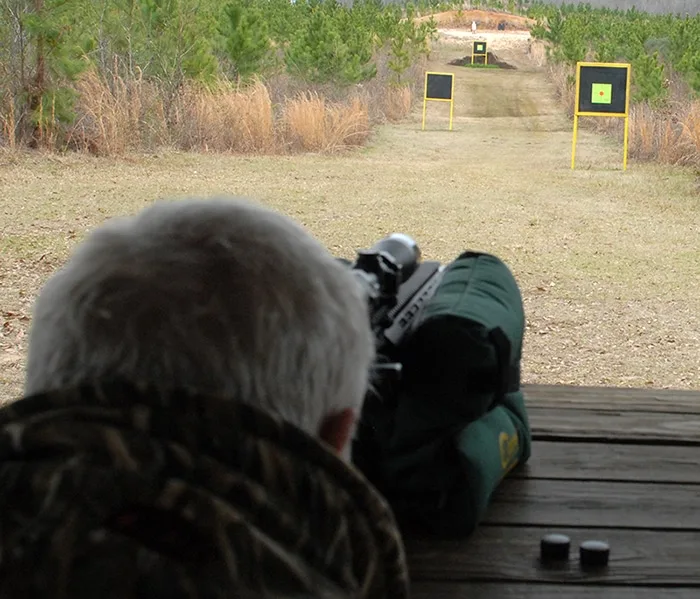
Image source: Bing (Web (fair-use with source credit))
Step 1: Unload and Secure the Rifle
Open the action. Check the chamber. Remove the magazine.
Point the rifle in a safe direction. You never adjust a scope on a loaded firearm.
Step 2: Bore Sight at 50 Yards
Remove the bolt. Align the bore with the center of the target at 50 yards. Then install the scope and adjust the windage and elevation turrets until the crosshairs sit on the target center.
This gets you on paper before you spend ammo.
Step 3: Establish a Zero at 100 Yards
Move to 100 yards. Shoot a three-shot group. Measure where the group center lands relative to your crosshairs.
This is your starting point for windage adjustment.
Step 4: Measure Your Horizontal Shift
Count how far left or right the group center sits from your point of aim. Use inches or centimeters. Then calculate the clicks you need based on your click value.
For example, say you're 1.5 inches right at 100 yards. If your click value is ¼ MOA (about 0.73 inches per click), you need roughly two clicks left.
Step 5: Dial the Windage Turret
Turn the turret in the direction that moves your point of impact toward center. On most scopes, turning the windage turret to the right moves impact right. But some scopes reverse this.
If your first correction makes things worse, reverse the direction and shoot again.
Step 6: Shoot a Confirmation Group
Fire another three-shot group and measure the new center. You should be much closer to your crosshair point of aim. If you're close but not perfect, make a smaller adjustment and confirm once more.
Step 7: Reset Your Zero Stop
If your scope has a zero stop, set it now. Turn your windage turret back to your established zero and engage the stop mechanism. This gives you a reliable reference point every time you pick up the rifle.
Dialing the Turret vs. Holding Off: Which Windage Method to Use
Both methods work, but they suit different situations. The right choice depends on your shooting context and what your scope is designed for.
When to Dial Windage
Dial windage when you have time, the wind is steady, and your turret tracks consistently. This method is standard in long-range precision shooting, PRS matches, and F-Class competition. Dialing gives you the most precise correction available.
When to Hold Off
Hold off with the reticle when the wind changes quickly or your scope doesn't have exposed turrets. Many hunters and tactical shooters use subtensions (the hash marks inside the reticle) to apply a quick correction without touching a dial.
On a second focal plane (SFP) scope, reticle markings only show true at one magnification level. On a front focal plane (FFP) scope, the markings stay accurate across all magnifications. This means an FFP scope lets you hold off reliably at any power setting.
| Scenario | Best Method | Why |
|---|---|---|
| Steady crosswind at 300 yds | Dial turret | Precise, repeatable correction |
| Wind gusting and changing | Hold off with reticle | Faster adjustment shot to shot |
| Hunting at 200 yds, light wind | Dial once, then shoot | Simple and reliable |
| Rapid-fire competition stage | Hold off | No time to dial between shots |
Ballistic Apps and DOPE Cards
A ballistic calculator app can pre-compute your windage correction for any wind speed and distance. Input your bullet data, zero distance, and current wind speed. The app returns a click value or hold point.
Many shooters keep a DOPE card (Data On Previous Engagements) taped to their rifle or scope for quick reference.
Windage Mistakes That Shift Your Point of Impact
These are the errors that cause the most frustration. Each one produces a missed shot, but none of them feel like a scope problem while you're shooting.
1. Assuming Your Turret Tracks Perfectly
Scope turrets aren't perfect machines. Some have mechanical slop that causes a few clicks of backlash before the reticle starts moving. Test this by dialing 10 clicks left and shooting a group.
Then dial 10 clicks right and shoot again. If both groups don't land in the same spot, your turret has tracking error that you need to account for.
2. Mixing MOA and MIL Corrections
If your scope is calibrated in MOA and you apply a MIL correction from an app, your windage will be off by roughly 2.7 times. Always confirm which system your scope uses before you dial anything. Check the turret markings or the spec sheet in your manual.
3. Ignoring Actual Wind Speed
Many shooters dial a default value without reading the wind. A 10 mph crosswind at 200 yards produces a very different correction than at 500 yards. Use an anemometer, read the range flags, or at minimum practice estimating wind speed before every shot.
4. Wrong Ring Torque
Loose scope rings let the scope shift under recoil, causing your zero to wander. This looks like a windage problem, but it's a mounting problem. Ring torque specs are usually 15 to 20 inch-pounds.
Base torque is often 20 to 25 inch-pounds.
The National Shooting Sports Foundation recommends using a torque wrench and following the manufacturer's specific values. Don't guess.
5. Skipping Confirmation Groups
Dialing a correction and walking away without verifying it is a recipe for a bad zero. Always shoot a confirmation group after every adjustment. If you're not at the range, at least dry-fire and confirm the turret returns to your zero stop cleanly.