Have you ever tried to open your rifle safe, only to find that the biometric scanner isn’t reading your fingerprint? It’s frustrating, especially when you need quick access and don’t know why it’s not working.
You might be wondering if the scanner is broken, if you’re doing something wrong, or if there’s a simple fix you can try right now. You’ll discover the common reasons why your rifle safe’s biometric scanner fails to read and what you can do to get it working smoothly again.
Keep reading—you’ll find easy solutions that save you time and stress.
Common Causes Of Biometric Scanner Issues
Biometric scanners on rifle safes offer quick access, but sometimes they fail to read fingerprints. Understanding the common causes helps fix the problem fast. Many issues come from simple mistakes or small faults. Identifying these can save time and avoid frustration.
Dirty Or Smudged Scanner Surface
Fingerprints, dust, and dirt block the scanner’s sensor. A dirty surface prevents it from reading correctly. Wipe the scanner gently with a soft cloth. Clean surfaces improve accuracy and speed.
Low Battery Or Power Problems
Low battery power can disrupt scanner function. The scanner may not get enough energy to work well. Replace or recharge batteries regularly to avoid this. Check power connections if your safe uses external power.
Software Or Firmware Glitches
Software errors can cause the scanner to freeze or misread. Firmware updates fix bugs and improve performance. Restart the safe or update its software to clear glitches. Follow the manufacturer’s instructions carefully.
Improper Finger Placement
Placing the finger incorrectly leads to reading failure. The scanner needs full contact with the fingerprint area. Press the finger flat and steady on the sensor. Avoid moving or lifting the finger too soon.
Environmental Factors Affecting Performance
Extreme temperatures, moisture, or dirt affect scanner performance. High humidity or cold can cause errors. Keep the safe in a dry, moderate environment. Protect the scanner from rain, dust, and direct sunlight.

Quick Troubleshooting Steps
When the biometric scanner on your rifle safe stops reading fingerprints, quick troubleshooting can help. Simple checks often solve the problem without extra tools or expert help. Follow these steps to get your scanner working again fast.
Cleaning The Scanner Lens
Dirt, dust, and oil can block the scanner lens. Use a soft cloth to gently wipe the lens. Avoid using harsh chemicals or rough materials that could scratch it. Keep the lens clean for accurate readings.
Checking And Replacing Batteries
Low battery power can cause the scanner to fail. Open the battery compartment and check the power level. Replace old or weak batteries with new ones. Fresh batteries help maintain strong scanner performance.
Restarting The Device
Restarting can reset minor errors in the system. Turn off your rifle safe and wait for 30 seconds. Turn it back on and try the fingerprint scanner again. This simple step often restores normal function.
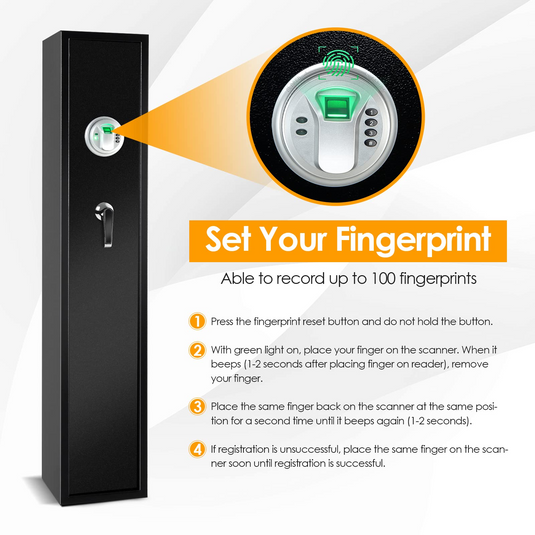
Re-registering Fingerprints
Scans may fail if fingerprints were not registered well. Delete old fingerprints from the system. Re-register your fingerprints carefully, covering different angles. This improves the scanner’s ability to recognize your prints.
Resetting To Factory Settings
Resetting clears all data and restores original settings. Use this step only if other fixes fail. Follow the manual to perform a factory reset safely. After resetting, reprogram your fingerprints for use.
Preventive Tips For Reliable Scanner Performance
Keeping your rifle safe’s biometric scanner working well requires simple daily care. Small actions can stop most scanner problems. Following easy steps helps the scanner read your fingerprint quickly and correctly every time.
Regular Maintenance And Cleaning
Clean the scanner surface often with a soft, dry cloth. Dirt and oils block the sensor. Avoid harsh chemicals that may damage the scanner. Regular cleaning keeps the sensor clear and ready to scan.
Avoiding Moisture And Extreme Temperatures
Keep the safe away from water and damp places. Moisture can harm the scanner’s electronics. Do not place the safe in very hot or cold spots. Extreme temperatures affect scanner accuracy and lifespan.
Keeping Firmware Updated
Check for updates from the safe’s manufacturer. Firmware updates fix bugs and improve scanner performance. Follow instructions carefully to install updates. Updated software helps the scanner work smoothly and reliably.
Proper Finger Placement Techniques
Place your finger flat and steady on the scanner. Avoid moving or tilting your finger during scanning. Use the same finger you registered. Good finger placement ensures faster, more accurate scans.
When To Seek Professional Help
Knowing when to get expert help can save time and protect your rifle safe. Some issues need more than simple fixes. Recognizing these signs helps you avoid damage and ensures your safe works correctly.
Persistent Scanner Failures
If the biometric scanner keeps failing after cleaning and resetting, it may need professional repair. Repeated errors or inability to read fingerprints indicate a deeper problem. Professionals can diagnose and fix scanner issues safely.
Hardware Damage Signs
Look for cracks, loose parts, or unusual noises around the scanner. Physical damage often causes reading problems. Attempting to fix hardware yourself can worsen the issue. A technician can check and replace damaged components properly.
Warranty And Support Options
Check your safe’s warranty before trying repairs. Many manufacturers offer support or repair services under warranty terms. Contacting customer service can provide guidance or arrange professional maintenance. Using authorized services keeps your warranty valid.
Frequently Asked Questions
Why Is My Rifle Safe Biometric Scanner Not Reading?
The scanner may have dirty sensors or unregistered fingerprints. Clean the sensor gently and re-register your fingerprints. Ensure your fingers are dry and properly positioned.
How To Fix Unresponsive Biometric Scanners On Rifle Safes?
Restart the safe’s electronic system and check battery levels. Replace batteries if low. Also, update the safe’s firmware if possible to improve scanner performance.
Can Environmental Factors Affect Rifle Safe Biometric Scanners?
Yes, extreme cold, heat, or moisture can impair scanner accuracy. Keep the safe in a stable environment and avoid touching the sensor with wet or dirty fingers.
What Should I Do If My Fingerprint Won’t Scan?
Try cleaning your finger and the scanner surface. Re-register your fingerprint ensuring full contact with the sensor. If problems persist, contact customer support.
Conclusion
A rifle safe’s biometric scanner may fail due to dirt or moisture. Clean the scanner gently and dry your fingers before use. Low battery power can also cause problems. Replace batteries regularly to keep it working well. Sometimes, the scanner needs resetting or reprogramming for better accuracy.
Regular maintenance helps avoid these issues. Keep your safe’s scanner clean, dry, and powered. This will ensure quick and reliable access every time. Simple care makes a big difference in scanner performance. Stay safe and confident with a properly working biometric scanner.