If you own a digital rifle safe, you know how important it is to keep your firearms secure. But what happens when you need to reset the lock?
Maybe you forgot your code, or you want to change it for extra security. Don’t worry—resetting a digital rifle safe lock is easier than you think. You’ll discover simple, step-by-step instructions that anyone can follow. By the end, you’ll have full control over your safe’s lock, giving you peace of mind and quick access when you need it most.
Keep reading to learn exactly how to reset your digital rifle safe lock without stress or confusion.

Preparing To Reset Your Safe
Preparing to reset your digital rifle safe lock is an important first step. This process ensures everything is ready for a smooth reset. It helps avoid mistakes and saves time. Follow the steps carefully to prepare your safe for resetting.
Gather Necessary Tools
Start by collecting all tools needed for the reset. Usually, you will need a small screwdriver. A flashlight can help if the safe is in a dark place. Keep the safe’s manual nearby. It has important details about your specific model.
Locate The Reset Button
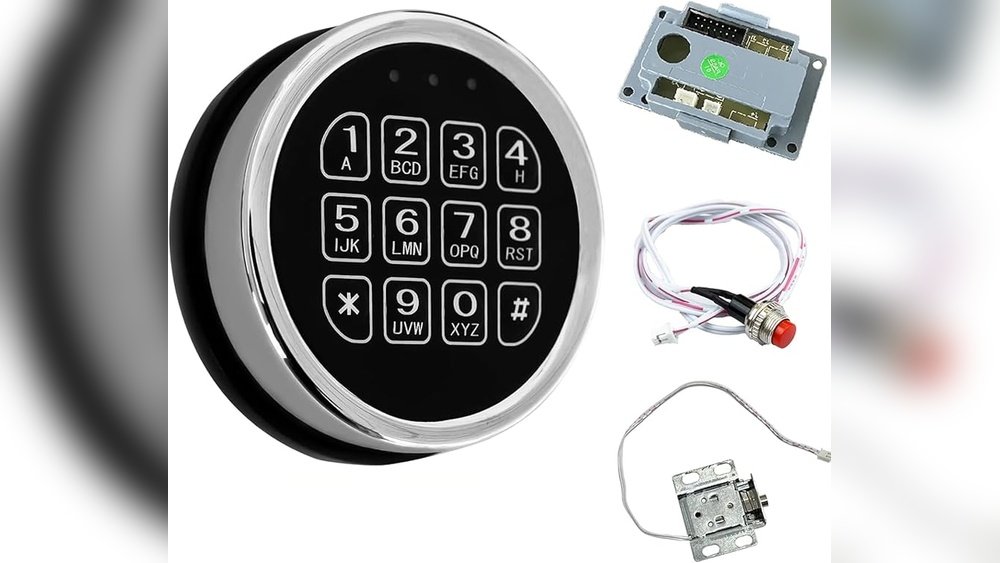
The reset button is key to changing your code. It is often inside the door panel or near the battery compartment. Use the flashlight to spot it easily. Pressing this button starts the reset process. Knowing its location saves time and effort.
Check Battery Status
Strong batteries are essential for the safe to work properly. Old or weak batteries may cause reset failure. Open the battery compartment and check the batteries. Replace them if they look old or weak. This step ensures your safe responds well during the reset.

Resetting The Lock Code
Resetting the lock code on your digital rifle safe is simple. It helps keep your firearms secure by changing the access code regularly. Follow these steps carefully to update your code without trouble. Make sure to remember your new code after resetting it.
Enter Current Code
Start by entering your existing lock code. This confirms your identity to the safe. Input the code slowly and clearly. Press the ‘Enter’ or ” key after typing the code. The safe will signal if the code is accepted.
Press The Reset Button
Locate the reset button inside the safe door or near the lock. Use a small tool like a paperclip to press it. Hold the button for a few seconds. The safe will beep or show a light to confirm reset mode.
Input New Code
Type your new code carefully. Choose a number sequence easy to remember but hard to guess. Enter the code fully and press ‘Enter’ or ”. Avoid using simple patterns like ‘1234’ or ‘0000’.
Confirm New Code
Re-enter the new code to confirm it. This step ensures no mistakes were made. Press ‘Enter’ or ” after typing the code again. The safe will beep or flash to show success. Your lock code is now reset.
Testing The New Code
Testing the new code is an important step after resetting your digital rifle safe lock. This step makes sure the lock works well with the new code. You avoid being locked out or needing to reset it again. Follow these simple actions to check your new code.
Lock And Unlock The Safe
Start by closing the safe door firmly. Enter the new code slowly and carefully. Press the unlock button or turn the handle, depending on your safe model. The safe should open smoothly. Close the door and lock it again using the new code. Repeat this process a few times. This confirms the lock responds correctly every time.
Troubleshooting Common Issues
If the safe does not open, check the code entry. Make sure you press all buttons fully and in order. Batteries may cause problems. Try replacing them with fresh ones. Check the lock’s manual for reset instructions. Sometimes, waiting a few seconds before retrying helps. If issues persist, contact customer support or a locksmith.
Additional Tips For Safe Security
Keeping your digital rifle safe secure goes beyond just resetting the lock. Small actions can make a big difference. These tips help protect your valuables and keep your safe working well.
Choosing A Strong Code
Pick a code that is hard to guess. Avoid simple numbers like “1234” or birthdates. Use a mix of numbers that you can remember but others cannot guess. Change the code regularly to increase security. Do not share the code with many people.
Regular Maintenance
Check your safe often to keep it in good shape. Clean the keypad and lock gently to avoid damage. Test the lock to ensure it opens smoothly. Keep the safe in a dry place to prevent rust or wear. Regular care helps the safe last longer and work better.
When To Replace Batteries
Watch for signs that batteries are low, like slow response or weak beeps. Replace batteries before they die to avoid lockouts. Use fresh, high-quality batteries for better performance. Keep spare batteries nearby for quick replacement. This keeps your safe ready to use at all times.
Frequently Asked Questions
How Do I Reset My Digital Rifle Safe Lock?
To reset your digital rifle safe lock, open the safe and locate the reset button inside. Press and hold it until a beep sounds, then enter your new code. Confirm the new code by re-entering it. Always refer to your safe’s manual for specific instructions.
What If I Forget My Digital Rifle Safe Code?
If you forget the code, check if your safe has a backup key. Otherwise, contact the manufacturer’s customer support with proof of ownership. They can guide you through the reset process or provide a master reset option.
Can I Change The Code On My Rifle Safe Lock?
Yes, you can change the code anytime. Open the safe, find the reset button inside, and follow the reset instructions. Changing your code regularly enhances security and keeps your valuables protected from unauthorized access.
Is Resetting The Digital Lock Safe For My Rifle Safe?
Resetting the digital lock is safe if done correctly. It doesn’t damage the locking mechanism but ensures your access code stays secure. Always follow manufacturer guidelines to avoid lockouts or malfunctions.
Conclusion
Resetting a digital rifle safe lock is simple with clear steps. Always follow the instructions carefully to avoid mistakes. Keep your new code in a safe place. Test the lock a few times after resetting it. This helps ensure your safe stays secure.
Regularly updating your code adds extra protection. Stay calm and patient during the process. A properly set lock keeps your rifles safe and secure.