Most shooters meeting a 0.1 MIL scope turret for the first time wonder the same thing: what does 0.1 MIL adjustment mean? In short, one click shifts your point of impact by one-tenth of a milliradian. That's the basic angular unit behind most modern precision rifle scopes.
At 100 meters, a single 0.1 MIL click equals exactly 1 centimeter of impact movement. At 100 yards, that same click moves you about 0.36 inches. As of 2026, 0.1 MIL turret clicks are the dominant standard in competitive precision rifle shooting.
Let's break down the math.
Quick Answer
A 0.1 MIL click moves the point of impact one-tenth of a milliradian. That equals exactly 1 centimeter at 100 meters. Or 0.36 inches at 100 yards.
Ten clicks equal one full milliradian. The correction scales linearly with distance, so no unit conversion is needed.
Why 0.1 MIL Adjustments Confuse So Many Shooters
If you've spent time behind a rifle scope, you've probably hit this wall. Most new shooters learned MOA (minute of angle) first, where one click equals a quarter-MOA. Then they pick up a MIL-based scope and face 0.1 MIL clicks, which work differently.
The core problem is unit mixing. One milliradian equals about 3.4377 minutes of angle. That conversion isn't quick enough to apply on the fly.
If you mentally translate 0.1 MIL clicks into MOA, you'll overcorrect every time. NIST provides reference standards for angular units, but most shooters never consult them.
It gets worse. Not all scopes use 0.1 MIL clicks. Some models offer 0.2 MIL or even 0.5 MIL per click.
Manufacturer specifications vary, and turret labels aren't always obvious. If you assume 0.1 MIL without checking, your zero will be off.
The fix is straightforward. Our research shows that shooters who treat MIL as its own system make fewer zeroing errors. Stop converting everything to MOA.
Learn to think in MIL.
What Does 0.1 MIL Actually Mean? The Math Behind the Click
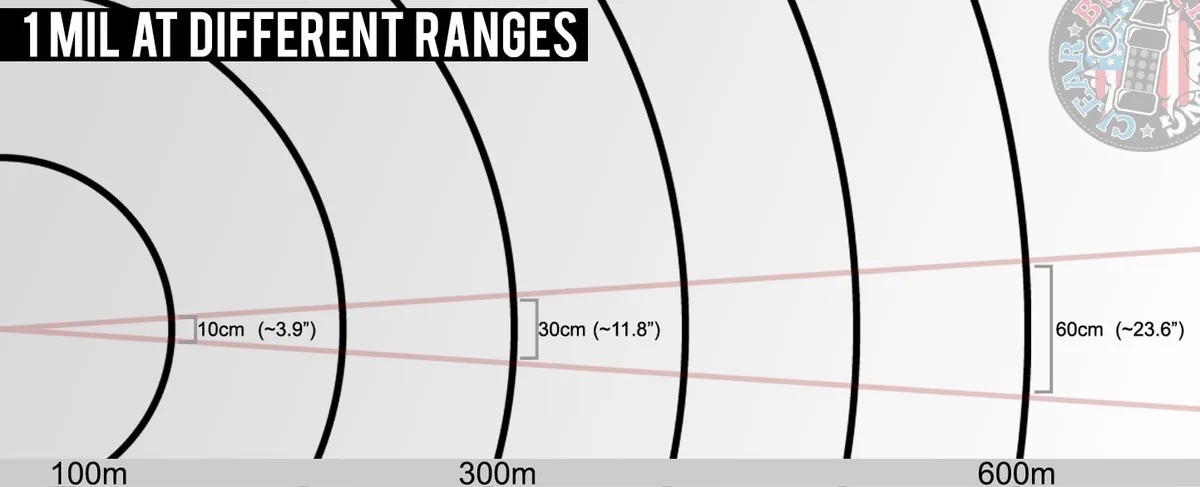
A milliradian (MIL) is an angular measurement. One full milliradian equals one thousandth of a radian. The radian is a standard unit used across science and engineering.
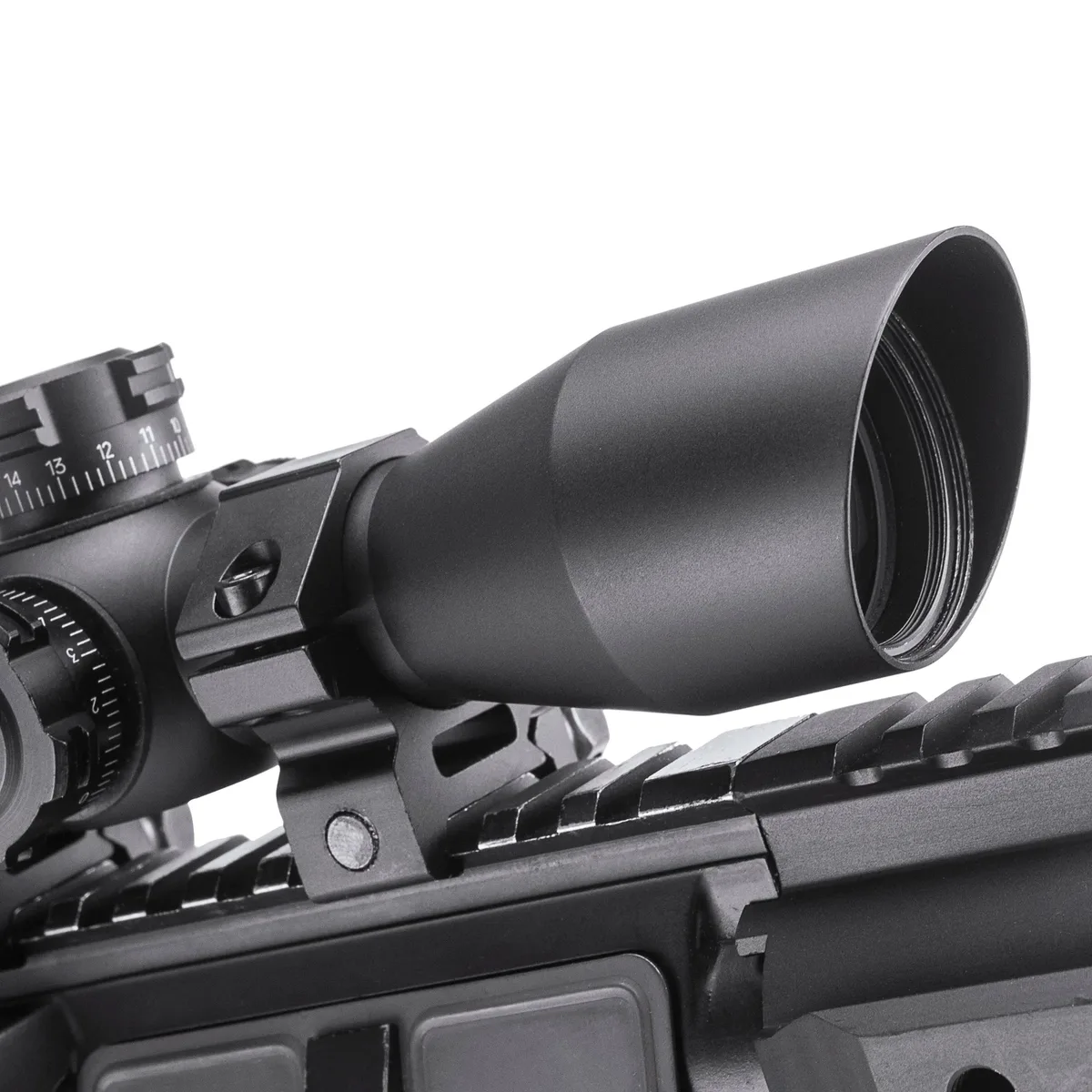
When a scope turret says 0.1 MIL, each click rotates the reticle by exactly one-tenth of a milliradian.
The metric system makes this clean. One milliradian equals 10 centimeters at 100 meters. So 0.1 MIL equals exactly 1 centimeter at 100 meters.
At 100 yards, that same click moves your point of impact about 0.36 inches.
The relationship scales linearly. Double the distance and the correction doubles too. Here's how turret clicks translate to real-world measurements:
| Distance | 0.1 MIL (1 click) | 1.0 MIL (10 clicks) |
|---|---|---|
| 100 meters | 1 cm | 10 cm |
| 200 meters | 2 cm | 20 cm |
| 500 meters | 5 cm | 50 cm |
| 1000 meters | 10 cm | 100 cm |
Your scope tracks 0.1 MIL per click. You need to move your group 10 centimeters right at 100 meters. Dial 10 clicks.
At 500 meters, the same correction still requires 10 clicks. The angular unit handles the scaling automatically.
How Milliradians Scale With Distance (And Why That Matters)
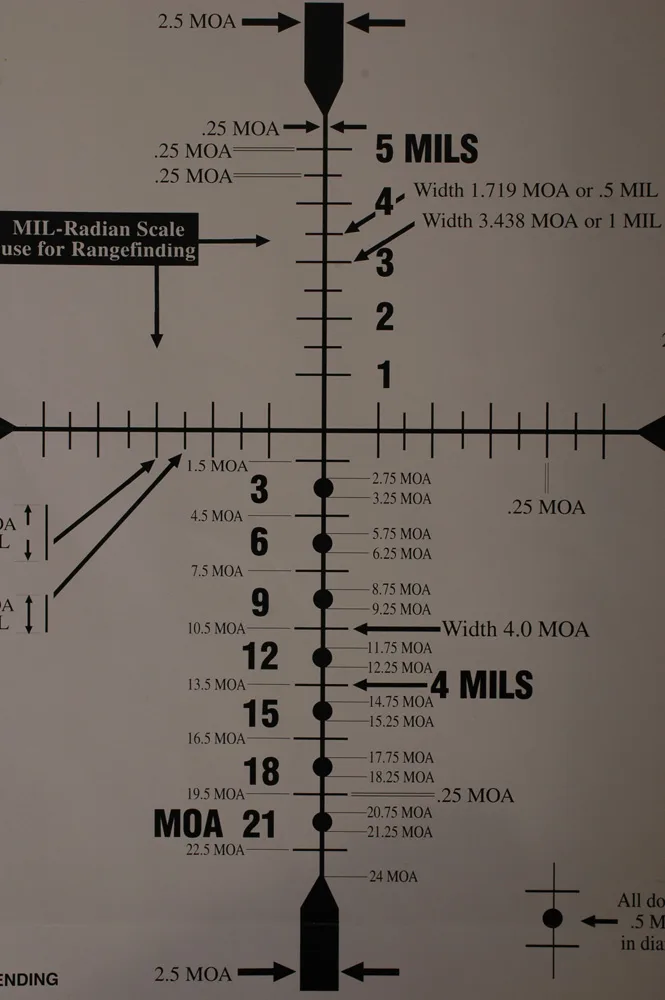
Here's what makes milliradians powerful. The correction at any distance is directly proportional to that distance. At 100 meters, 0.1 MIL equals 1 cm.
At 200 meters, it equals 2 cm. At 1000 meters, it equals 10 cm. The pattern never breaks.
This linear scaling is why MIL-based systems dominate long-range shooting. You don't need a separate conversion chart for each distance. Precision rifle competitions like PRS and NRL rely heavily on MIL-based turrets and reticles for exactly this reason.
Consider a real scenario. A shooter dials 0.1 MIL per click for windage at 200 meters. Each click moves the point of impact 2 cm to the right.
At 400 meters, each click moves the impact 4 cm. The shooter only needs to know the angular correction, not the physical measurement at every distance.
The same logic applies to MIL-based holdover calculations with a range finder. Estimate that your target subtends 1.5 mils in the reticle. Know the range.
Standard ballistic math gives you the required dial. This is where MIL systems truly shine in the field.
How to Apply 0.1 MIL Adjustments: A Step-by-Step Shooter Workflow
Applying 0.1 MIL corrections correctly starts with proper setup. Here's the workflow precision shooters follow for clean, repeatable results.
Step 1: Confirm the Turret Click Value
Check your scope manual or turret markings. Most precision models use 0.1 MIL per click. Some use 0.2 MIL.
Confirm before you zero. Brands like Vortex Optics document this clearly in their specifications.
Step 2: Shoot and Measure Your Zero Group
Mount the scope securely and level it. Fire a 3-round group at your zero distance, typically 100 yards or 100 meters. Measure the offset from your point of aim to the group center.
Step 3: Convert the Offset to MIL and Dial
At 100 yards, divide the offset in inches by 0.36 to get MIL. A 0.72-inch offset equals 2 MIL, or 20 clicks. Dial the correction in the right direction.
At 100 meters, divide the offset in centimeters by 10.
Step 4: Verify and Record Your Data
Fire another 3-round group to confirm the correction worked. Record the result on a dope chart or ballistic app. This becomes your baseline for field adjustments.
Step 5: Practice at Different Distances
Once your zero is set, dial corrections at varied ranges. Build a dope chart that maps distance to MIL holdover for your specific rifle and load combination.
0.1 MIL vs. 0.25 MOA vs. 0.2 MIL: Which Click Value Should You Use?
Not all scope turrets use the same click value. The three most common are 0.1 MIL, 0.25 MOA, and 0.2 MIL. Each suits different shooting disciplines.
| Click Value | Unit | Click at 100 Yards | Best For |
|---|---|---|---|
| 0.1 MIL | Milliradian | 0.36 inches | Precision rifle, PRS, NRL, metric shooters |
| 0.25 MOA | Minute of Angle | 0.25 inches | Long-range hunting, US competitive shooting |
| 0.2 MIL | Milliradian | 0.72 inches | Coarser tactical adjustments, military use |
0.1 MIL clicks give the finest granularity. Ten clicks equal one full milliradian. This is the standard for precision rifle competition because the metric math is clean and matches typical 0.1 mil reticle subtensions.
0.25 MOA clicks are slightly coarser. One MIL equals 3.4377 MOA, so 0.25 MOA is roughly 0.072 MIL per click. US competitive shooters who grew up on MOA often prefer this because their range cards are built in MOA.
0.2 MIL clicks offer a middle ground. Five clicks equal one full milliradian instead of ten. Military applications sometimes favor this for faster adjustments.
You lose resolution, though, so verify your math before zeroing.
For most precision shooters in 2026, 0.1 MIL clicks win on both math simplicity and resolution. If you're building a precision rifle setup from scratch, go MIL/MIL. Pair a MIL-based reticle with MIL-based turrets.
Match your click value to your ballistic data system.
Common 0.1 MIL Mistakes That Throw Off Your Zero
Even experienced shooters make these errors. Our research across competitive shooting forums and manufacturer support tickets shows that most zeroing problems trace back to one of these five issues.
Mixing MIL and MOA mid-calculation. You dial 0.1 MIL clicks but convert your correction in MOA. One MIL equals 3.4377 MOA, not 1. If you need a 1 MOA correction, that's about 34 clicks in MIL. Mixing units is the single biggest source of bad zeros.
Ignoring the turret's actual click value. Not every MIL scope uses 0.1 MIL clicks. Some use 0.2 or 0.5 MIL per click. If your turret is actually 0.2 MIL and you assume 0.1 MIL, your corrections will be half as large as needed. Always verify before dialing.
Miscalculating at distance. At 300 yards, one 0.1 MIL click moves impact about 1.08 inches. Shooters who treat it as 0.36 inches will dramatically undercorrect. Scale your base measurement by the range every time.
Forgetting reticle subtension changes. In first focal plane scopes, mil-based reticle marks scale with magnification. In second focal plane scopes, subtensions are only accurate at one magnification setting, usually max.
Not verifying after dialing. Always confirm your correction with a follow-up group. Trusting the math without verification leads to compounding errors downrange.
Frequently Asked Questions
What does 0.1 MIL adjustment mean on a rifle scope?
A 0.1 MIL adjustment means each turret click moves the point of impact one-tenth of a milliradian. At 100 meters, that equals exactly 1 centimeter. At 100 yards, it equals about 0.36 inches.
Ten clicks make one full milliradian.
How many clicks equal 1 MIL on a 0.1 MIL turret?
A 0.1 MIL turret requires exactly 10 clicks to equal one full milliradian. At 100 meters, those 10 clicks move the point of impact 10 centimeters. The number of clicks needed does not change with distance.
Is 0.1 MIL the same as 0.1 MOA?
No. One milliradian equals approximately 3.4377 minutes of angle. So 0.1 MIL equals about 0.34377 MOA.
Treating them as the same value leads to overcorrections. They are separate angular units.
What distance is best for zeroing a 0.1 MIL scope?
Most precision shooters zero at 100 yards or 100 meters. The math stays simple because 0.1 MIL equals 1 cm at 100 meters and 0.36 inches at 100 yards. Build your dope chart from that baseline.
How do I convert MIL to inches at any distance?
Multiply your MIL value by the range in yards, then divide by 27.78 to get inches of drop. Alternatively, one 0.1 MIL click equals 0.36 inches at 100 yards and scales linearly. At 300 yards, one click equals 1.08 inches.
Do FFP and SFP scopes handle 0.1 MIL adjustments differently?
The turret clicks are the same on both. What differs is reticle subtension behavior. First focal plane scopes keep MIL values accurate at all magnifications.
Second focal plane scopes only show correct MIL subtensions at one setting, typically maximum magnification.
Final Decision Guide: When 0.1 MIL Clicks Make Sense for You
If you're a precision rifle competitor, a metric-measuring shooter, or someone building a MIL/MIL scope setup, 0.1 MIL clicks are the right call. The math is cleaner than MOA, the granularity is finer than 0.2 MIL, and it matches the majority of competition-grade reticles and ballistic solvers on the market as of 2026.
If you shoot primarily in an imperial context with MOA-based range cards, stick with 0.25 MOA clicks. Trying to force MIL onto an MOA workflow just adds confusion.
For military or tactical applications where speed matters more than fine adjustment, 0.2 MIL clicks may suit you. You trade resolution for faster dialing.
Match your turret click value to your reticle system, your ballistic app, and your measuring units. That alignment is what makes 0.1 MIL adjustments actually work in the field.